Is Hide In Pixels cross-platform?
The official description lists PC, console, and mobile support. The round rules are the same, but painting precision differs by input device.
Platforms
The game runs on PC, console, and mobile. The platform changes how precisely you can paint, not what the round asks you to do.
Updated
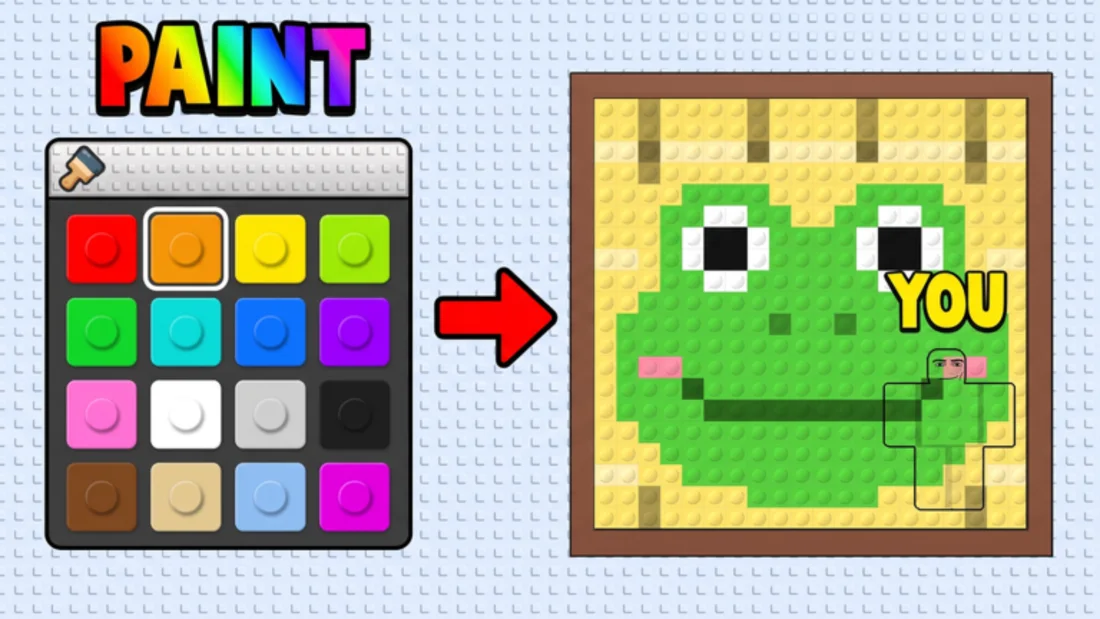
Every version of Hide In Pixels uses the same round structure: paint, freeze, hunt. The difference is how precisely you can place blocks. A mouse can move to a single block and click it. A controller moves a cursor or a selection across the palette and the body, which takes longer for small corrections. A touchscreen uses a finger, which is fast for large areas and imprecise for edges.
That difference matters because the paint phase is a timed task. PC players can afford a more detailed pattern. Console and mobile players should plan a simpler pattern from the start, because the time they lose on small corrections is time they cannot spend on the outline.
The practical rule for every platform is the same: paint the largest blocks first. The smaller the screen or the less precise the input, the more important that rule becomes.
| Platform | Strength | Limitation | Adjustment |
|---|---|---|---|
| PC | Precise block placement | None specific | Use the full palette and fix edges last |
| Console | Stable camera and movement | Slower small corrections | Use fewer colors and larger blocks |
| Mobile | Fast large-area painting | Less precise edges | Choose busy spots and avoid fine outlines |
PC is the most forgiving platform for blending because the mouse can place a block exactly where you want it. The main risk is speed: it is easy to paint a lot of detail and run out of time on the outline. PC players should resist the urge to fill every small shape.
Keep the camera at a distance where you can see both your character and the painting. Zooming in helps with a single block, but it hides the overall silhouette. The best blending decisions come from seeing the character and the background at the same scale the seeker will see them.
Use the mouse to fix edges, not to decorate the center. The center of the character is usually hidden by the body itself; the edges are what the seeker sees against the painting.
Console painting is slower for small corrections, so the winning strategy is to need fewer corrections. Pick a spot with large color regions, use three colors, and paint the biggest blocks first. A simple blend finished on time beats a detailed blend that is still incomplete when the freeze starts.
The camera is the console player's advantage. A controller can hold a stable view while the character stands still, which makes it easier to compare the painting and the body. Use that stability: after each pass, stop and look at the whole character instead of adjusting block by block.
If you are learning on console, practice in a private server. The slower input is much easier to learn without a seeker walking toward you. Once the pattern is automatic, the input speed matters less because you are not deciding where each block goes.
Mobile painting is fast for large areas and imprecise for edges. The best mobile strategy is to choose a hiding spot in a busy part of the painting, where a slightly rough edge is absorbed by the surrounding pattern. A flat background exposes every imprecise block.
Screen size matters more than most players expect. On a small phone, the painting and the character may not fit in the same view, which makes it hard to compare colors. Zoom out if the game allows it, or use a spot near the edge of the painting where both the body and the background are visible.
Touch players should also avoid last-second repairs. A misplaced block is harder to undo precisely on a touchscreen, and the attempt often creates a second mistake. If the blend is close, leave it and freeze.
The game does not publish a universal sensitivity recommendation, and the right value depends on your device and your habits. The general rule is to use a sensitivity that lets you turn quickly during the hunt without making small camera adjustments during the freeze. A camera that drifts while you are standing still is a giveaway.
Before a match, test a slow turn and a small adjustment. If the camera overshoots when you try to center the painting, lower the sensitivity. If you cannot turn fast enough to check a sound, raise it. The setting is personal, but the test is the same.
During the freeze, stop touching the camera. The seeker is looking for movement, and a camera that keeps drifting is movement. Settle on a view that shows the painting and the character, then leave it alone.
Controller players often ask how to paint precisely. The honest answer is that the controller is slower for single-block corrections, so the workaround is to reduce the number of corrections. Choose a spot with large color fields, paint the biggest areas first, and accept a rougher edge than a PC player would.
Another workaround is to paint in horizontal or vertical strips instead of jumping around the character. A consistent direction reduces cursor travel and makes the pattern easier to finish. It also makes it easier to see which strip is still unpainted.
If the game offers a cursor speed or aim sensitivity setting, test it in a private server before a public match. A faster cursor helps with large areas but hurts edge work; a slower cursor is the opposite. Pick the value that matches the pattern you actually paint.
Look for graphics settings that affect visibility, camera sensitivity, and UI scale. A UI that covers the painting or the palette makes the round harder than it needs to be. A camera that is too close hides the silhouette. These are small changes, but they matter in a game where the difference between a win and a loss is often one visible edge.
If the game offers a way to hide other players or reduce visual noise in a private server, use it while practicing. The goal is to see the painting and your character clearly, not to recreate a busy public server.
Finally, check the platform's own controller or touch settings. Stick drift, a laggy touch response, or an oversized cursor can all make painting harder. A quick test before the first round is cheaper than losing a match to an input problem.
FAQ
The official description lists PC, console, and mobile support. The round rules are the same, but painting precision differs by input device.
PC gives the most precise painting control. Console and mobile are viable, but they reward simpler patterns and more patience.
Small corrections take longer with a controller cursor. The fix is to use fewer colors and larger blocks, not to paint faster.